

Manage Scheme settings
Initiate Auto-adding New methods
- Go to Processing and choose the Payment scheme you previously created on the grid.
- The Default Payment scheme or the Payment scheme created with the All Methods option includes Auto-adding New methods parameter enabled automatically.
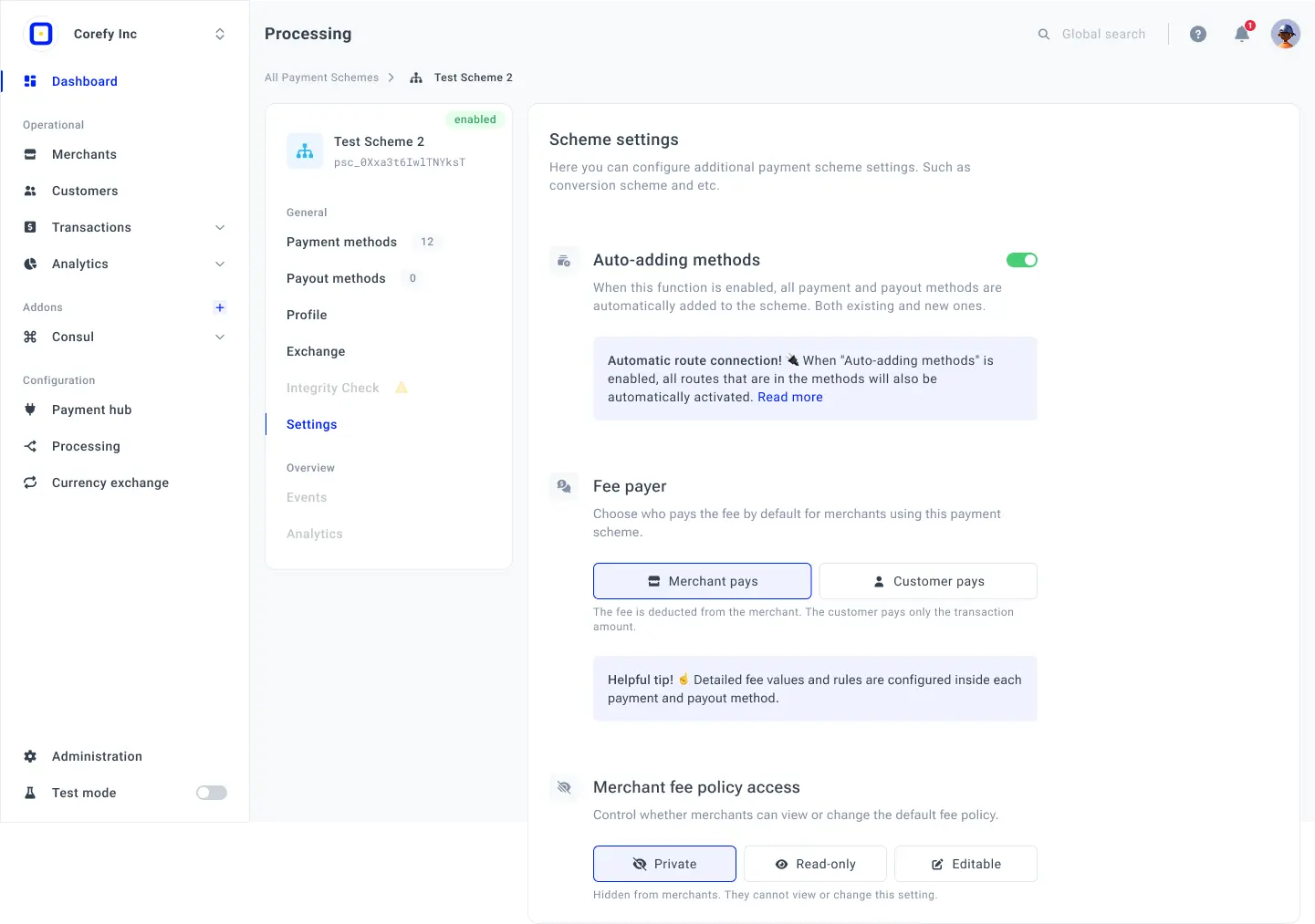
- To review or switch off the parameter, navigate to the Settings tab and click the Auto-adding Payment methods toggle.
- The parameter can influence the process in the following ways:
| The influenced entities ↓ | Parameter → Switched ON | Parameter → Switched OFF |
| Methods | The Methods are added and enabled automatically to the Payment scheme. | You can manually add Methods to the Payment scheme, but they remain disabled by default. Thus, you need to activate them manually, as well. |
| Routes | The Routes included in each added Method are enabled automatically. | You can choose the routes manually for the particular Method you decide to add. |
| Routing strategy | The Routing strategy is determined for all the Routes and relies on the Payment strategy you previously chose when launching the Organisation.
|
You can apply Routing rules and establish the Routing and Cascading based on your business case and needs. The Routing strategy is not predetermined. |

Manage Fees
Fee Policies
Fee Policies at the Payment scheme level define who pays the Fee by default and control how Merchants can access and manage Fee settings for their accounts. These settings establish the default Fee behaviour for Merchants using the Payment scheme.
Fee Payer
The Fee payer setting determines who is responsible for paying the Fee by default for Merchants using the Payment scheme. You can select one of the following options:
- Merchant pays: the Fee is deducted from the Merchant's funds. The Customer pays only the transaction amount.
- Customer pays: the Fee is charged to the Customer in addition to the transaction amount.
The selected option is applied by default to Merchants using the Payment scheme, unless they are allowed to change this setting at the Merchant account level.
Detailed Fee values and Custom Fee rules are configured separately within each Payment and Payout method. The Fee Payer setting determines who is responsible for paying the configured Fee.
Merchant Fee Policy access
The Merchant Fee policy access setting controls whether Merchants can view or modify the default Fee Policy configured for their Payment scheme.
The following access levels are available:
- Private: Merchants cannot view or modify the Fee policy configured at the Payment scheme level.
- Read-only: Merchants can view the default Fee policy but cannot change it.
- Editable: Merchants can view and modify the Fee policy for their Merchant account, including changing who pays the Fee.
Updated about 1 month ago