

Google Pay
Learn how Google Pay works and how to enable it in your payment flow.
What is Google Pay?
Google Pay is a secure, and convenient Payment method that enables Customers to make purchases using their saved cards across Android devices and browsers. It simplifies the Checkout experience by allowing users to pay in one click. For businesses, integrating Google Pay helps improve conversion rates, streamline the payment process, and provide Customers with a trusted and seamless way to complete their payments.
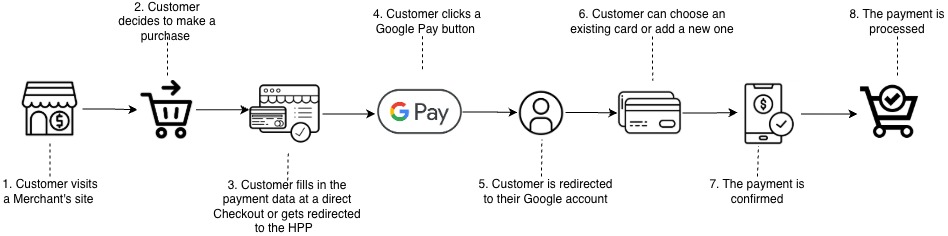
Google Pay flows
1. Google Pay · Google Pay (Native)
The Google Pay Native payment flow relies on a direct integration and appears as a Google Pay button at Corefy Checkout. Customers can complete their payment right at Checkout, without any redirects to external pages, ensuring a secure payment is processed without any delays.
Decrypt -> Step-by-step
- Your application or Checkout page requests the Customer’s payment details.
- The application displays the available Payment methods, including the Google Pay option.
- Your application requests the encrypted Google Pay payment data, and Google Pay authenticates the Customer.
- Your application processes the received encrypted payment data and sends it to your server.
- The back-end forwards the encrypted data to the Corefy Processing via a Merchant API Payment Request. We respond with the Payment Request ID and its initial status.
- We decrypt the Google Pay payment data, generate the Payment Request, and pass the card details to the Payment Service Provider (PSP) or Acquirer for transaction processing and payment result retrieval.
Routing is performed between different Provider accounts based on the card data obtained from the Decrypt.
- The Acquirer may require additional Customer verification, such as a 3DS or OTP test.
- We return the ACS redirect form to your back-end.
- Your application presents the ACS or OTP to the Customer.
- We receive the Issuer’s 3DS response.
- We request the Payment status from the Acquirer and complete the transaction flow.
- We send a Webhook to your application back-end; if no Webhook URL is configured, we expect your server to initiate a status request.
- Your application notifies the Customer about the final payment result.
Non-decrypt
In the Non-decrypt flow for Google Pay, the encrypted payment token is forwarded directly to the Acquirer or Payment Service Provider without being decrypted on our side. This reduces integration complexity, as the external Provider handles both the decryption and subsequent processing.
Routing is also possible, but only based on non-card attributes, such as Сustomer and System attributes.
2. Google Pay · Redirect
With the Redirect integration, Corefy Checkout forwards the Customer to an external payment page hosted by the Acquirer or PSP that supports Google Pay. The Customer finalises the payment directly on that Provider’s page using Google Pay on their device.
This integration model minimises the Merchant’s technical responsibilities because all operations involving token processing and payment handling are carried out by the external Provider. The main difference is in the user journey compared to the Google Pay Native flow, as the Customer temporarily leaves the Checkout and is redirected back to the Merchant’s website only after the transaction is completed.
Routing is similar to the Non-decrypt flow. Our platform performs Routing to Providers that support a Redirect strategy after a Customer initiates a payment. Non-card data is used in this procedure.
Google Pay 3DS
Google Pay provides strong device authentication, but 3DS may still be required depending on issuer decisions and regulatory obligations. When required, 3DS is handled in the same way as any other card-not-present transaction via ACS, not within Google Pay itself.
How does it work?
- Google Pay performs device-level authentication first (This step confirms the cardholder's identity at the device level).
- The issuer decides whether 3DS is required (the issuer may either accept device authentication as sufficient or require full 3DS verification).
- If 3DS is required, a challenge flow is initiated (this challenge occurs outside Google Pay, as Google Pay is only the Payment method, not the authentication handler).
- Successful 3DS verification (The payment is finalised as approved or declined).
Additional resources
Updated 10 months ago