

Salt Edge
Connect a Provider:
- Supported methods: SEPA Credit Transfer and SEPA Instant, Local (domestic) bank transfers, UK schemes (FPS, BACS, CHAPS), Pan-European banking providers and aggregators, Digital banks and fintech platforms, Sandbox/testing methods
- Supported currencies:EUR, GBP, USD
- Industries: Payments
- Geography:Central America, MENA, North America, North-West Europe, Persian Gulf countries, Rest of Asia Pacific, South America, South-East Europe
Salt Edge is an open banking platform that provides a unified API for accessing bank accounts, retrieving financial data, and initiating payments directly from users’ bank accounts. It enables businesses to integrate with multiple banks through a single connection, eliminating the need to build and maintain individual integrations.
This solution is widely used for Account Information and Payment Initiation use cases, helping businesses streamline bank connectivity and accelerate the development of financial services.
Set up account
- To start the set up procedure, go to the Salt Edge official website.
- Click Sign In in the top right corner of the main page.
- Then, click Sign Up and fill in the form to create an account.
- After creating an account, navigate to the connection settings to find the credentials.
- Create IP whitelist.
Connect Salt Edge on our Dashboard
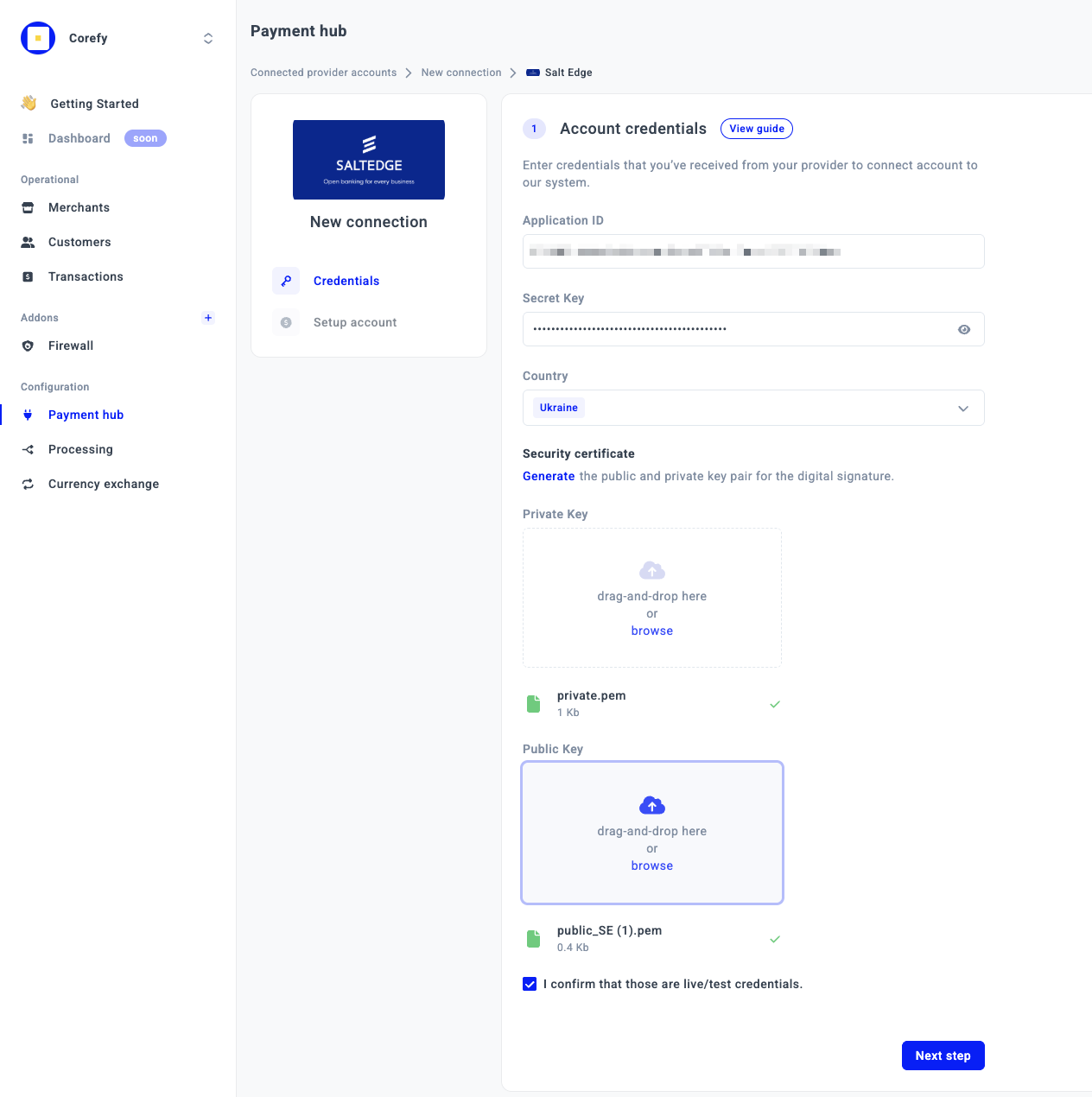
- To connect Salt Edge, navigate to a Payment Hub and click New connection.
- The system redirects you to the catalogue of available Providers. From the list of Providers, choose Salt Edge. Click Connect.
- Navigate to the Credentials tab and fill in the following fields:
| Field | Description |
| Application ID | Unique application identifier provided by the Payment Provider for API authentication and integration. |
| Secret Key | Private key used to authenticate and securely sign requests sent to the Provider. |
| Country | Country associated with the Merchant account or payment processing configuration. |
| Creditor Name | Full legal name of the creditor or beneficiary receiving the funds. |
| Creditor IBAN | International Bank Account Number (IBAN) of the creditor account used for settlements or payouts. |
| Creditor BIC | Bank Identifier Code (BIC/SWIFT) of the creditor’s bank. |
| Creditor Agent Name | Name of the financial institution or bank servicing the creditor account. |
| Creditor Address | Full registered address of the creditor. |
| Creditor Street Name | Street name from the creditor’s registered address. |
| Creditor Building Number | Building or house number from the creditor’s registered address. |
| Creditor Town | City or town specified in the creditor’s registered address. |
| Creditor Post Code | Postal or ZIP code of the creditor’s registered address. |
| Creditor Region | State, province, or region of the creditor’s registered address. |
| Creditor Country Code |
Two-letter ISO country code of the creditor’s country (for example, DE, FR, UA).
|
- Then, upload the security certificates: Private Key and Public Key.
- Click I confirm that those are live/test credentials.
- Click Next step.
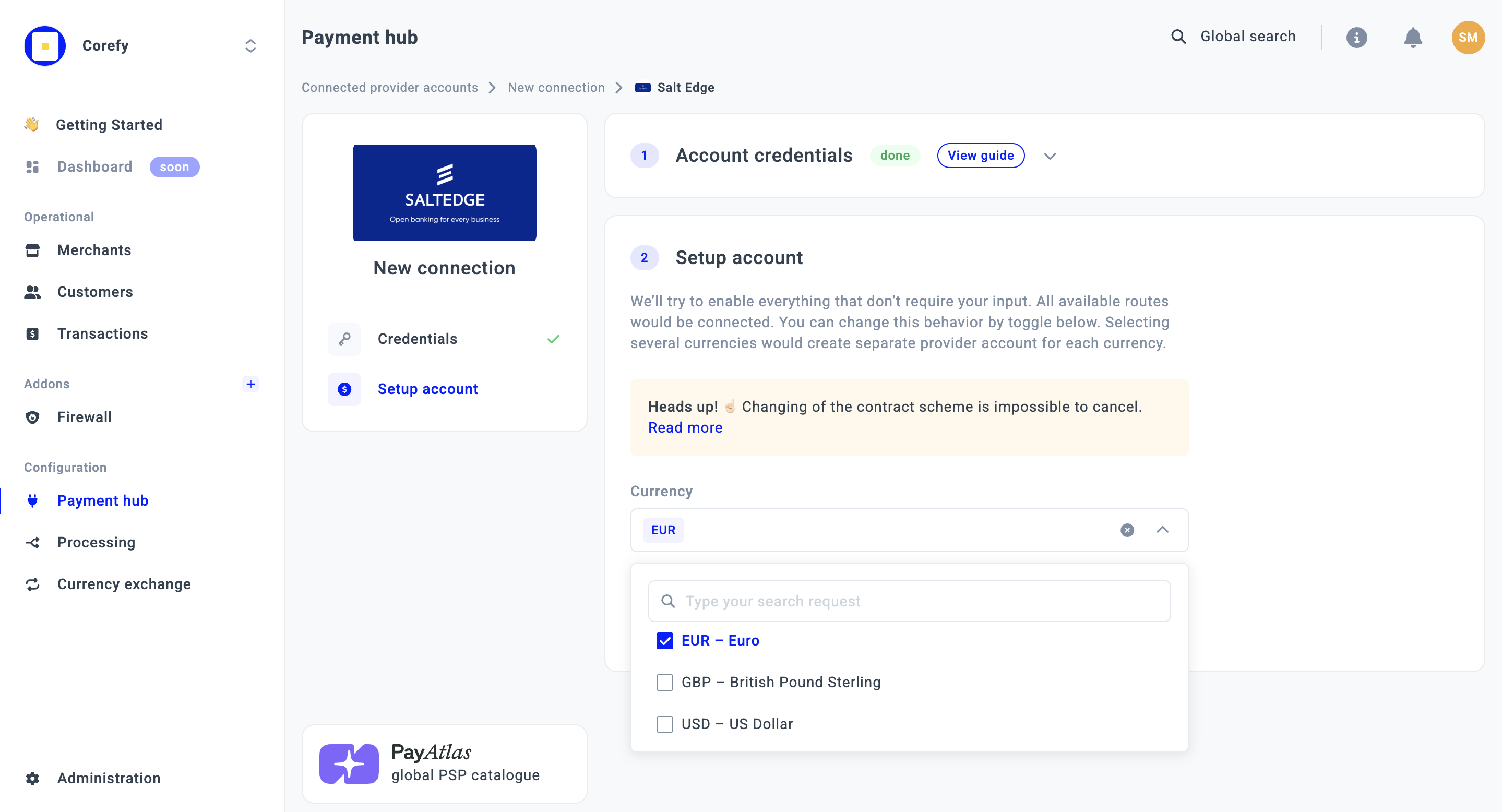
- Select the Currency from the combo box. If you select multiple Currencies, it should create a separate Provider account for each Currency.
- Then, click Connect.
Updated about 1 month ago
Did this page help you?