

Handle payment completion and 3-D Secure authentication
Complete a payment with Hosted fields
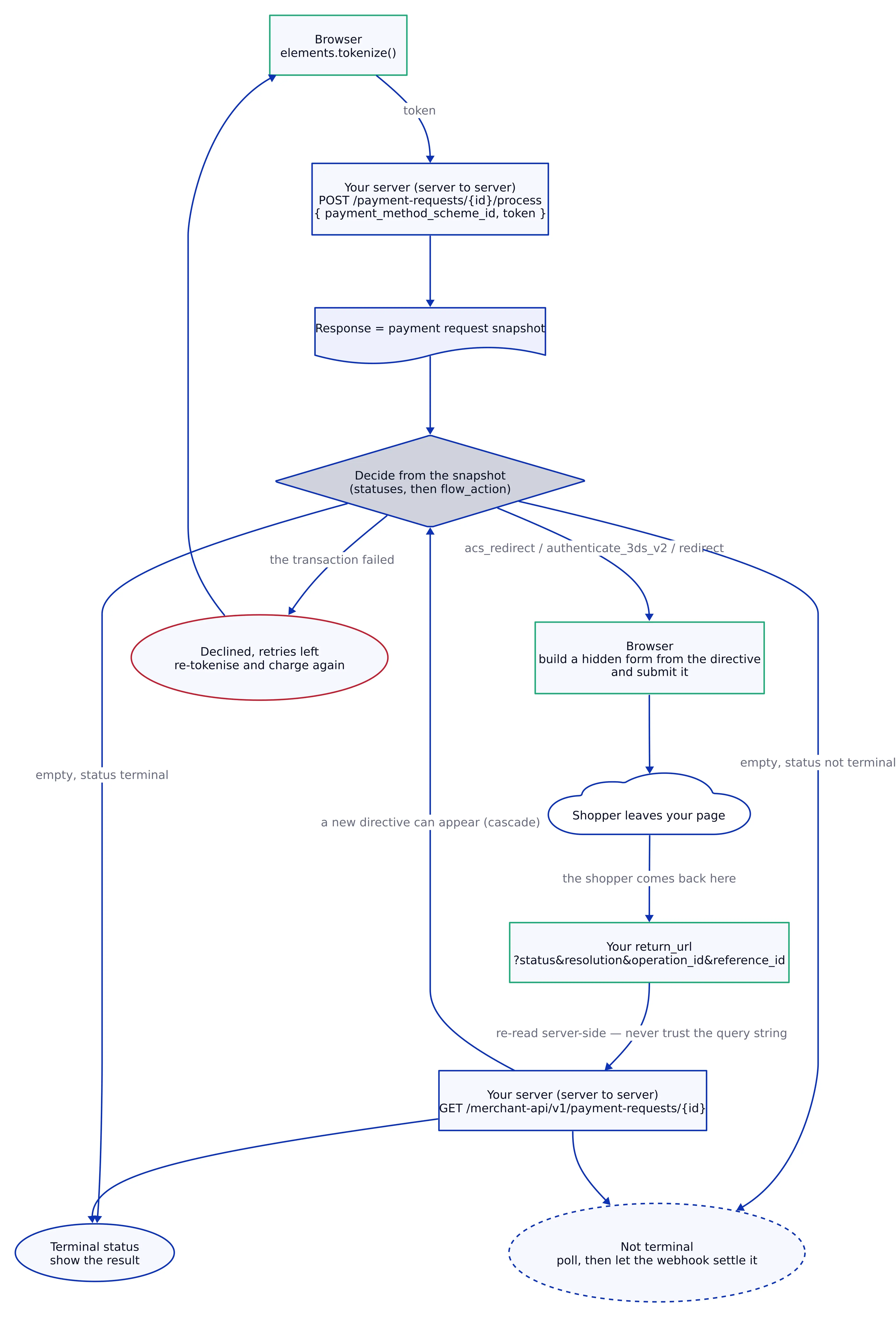
Once you have tokenised the customer's card details with the Hosted Fields SDK, use the token to complete the payment.
This guide continues the Configure Hosted fields SDK flow after elements.tokenize(). It explains how to:
- Process the token.
- Handle authentication when the issuer requires it.
- Follow redirects.
- Read the Payment Request state.
- Retry a declined payment.
- Confirm the payment result.
The SDK is not involved after tokenisation. It collects the card data and returns a token.
Your server then communicates with the Corefy API. The browser is only involved when it needs to submit an authentication or redirect action.
Understand the payment model
-
Use the Payment Request snapshot as the source of truth.
-
Every decision comes from the current Payment Request state, including:
status.active_payment_commit_info.status.active_payment_transaction_info.status.
-
Do not maintain the payment state separately in your application.
-
The payment model contains three levels:
| Term | Meaning |
|---|---|
| Payment Request | The complete payment lifecycle from creation to a terminal status. It uses a pr_... ID. |
| Payment Commit | One authorisation lifecycle inside the Payment Request. A declined transaction can finish the Commit or leave it open for another attempt. |
| Payment Transaction | One Provider attempt inside a Payment Commit. A Payment Commit can contain multiple transactions. |
| Snapshot | The Payment Request state returned by the API at a specific moment. active_payment_commit_info contains the current Commit, and active_payment_transaction_info contains the current transaction. |
| Directive | The flow_action object on the current transaction. It describes a form that the browser must submit. |
| Terminal status | A Payment Request status that does not change again. |
| Resolution | The reason behind a status. The Payment Request, Commit, and Transaction use separate resolution values. |
- Treat
flow_actionas a directive rather than as payment information. - When the system requires the browser to continue the payment flow, the active transaction contains a
flow_actionwith:
url.method.params.
- Submit the directive exactly as returned.
Do not parse, rename, reorder, or modify the Provider parameters.
Understand the return flow
- Set
options.return_urlwhen you create the Payment Request.
The parameter is mandatory.
-
After authentication or a redirect, the system returns the customer to this URL and appends four query parameters.
-
Treat these parameters as a Routing hint only.
-
The customer can modify values in the browser address bar. Read the Payment Request from your server before you act on the result.
-
Use Webhooks as the authoritative record of the final payment outcome.
A customer can close the browser tab during authentication and never return to your page. The payment can still resolve.
Configure the domain before loading Hosted fields
- If the Domain iFrame whitelist is enabled for Hosted fields, add the domain that serves your Checkout page to the whitelist.
- Hosted fields refuse to load on an unlisted domain.
- The SDK returns:
forbidden_origin
For more information, go to the Manage Security settings for Hosted fields guide.
Use the API keys
- Hosted fields uses two separate credentials.
| Credential | Use | Location |
Hosted Fields API key (hf_...) |
Create a Payment Request and process the token. | Hosted fields tab of the Merchant account. |
| Merchant API key | Read the Payment Request state. | API key settings. |
- The keys are not interchangeable.
- The Hosted Fields API does not accept the Merchant API key.
- The Merchant API does not accept the Hosted Fields API key.
You need both keys to complete the payment flow.
Use the Hosted Fields API key
-
Use the Hosted Fields API key to:
- Create a Payment Request.
- Process a Payment token.
-
Also pass the Hosted Fields API key to:
createElements({ apiKey }) -
The key is scoped to collecting card data and can be included in the browser application.
Use the Merchant API key
- Use the Merchant API key to read the Payment Request state.
- Keep this key on your server.
- Do not expose it in the browser.
Send API requests from the server
- Send both payment API calls from your server.
- The API does not allow the required cross-origin requests from the browser.
- A browser
fetchfails before the request reaches the API. - The Merchant API key must also remain on the server because it is a full account credential.
- The Hosted Fields SDK does not call these payment API endpoints.
The Corefy host that serves the Hosted fields iFrames communicates with the API server to server.
Configure the Hosted fields host
If you use:
createElements({ baseUrl })
set baseUrl to the Corefy host that serves the field iFrames.
This host is separate from both backend APIs.
Understand the payment flow
- The flow involves three components:
| Component | Responsibility |
| Browser | Loads Hosted fields, collects card details, tokenises them, and submits authentication or redirect directives. |
| Your server | Creates Payment Requests, processes tokens, and reads the result. |
| Corefy | Provides the API and the pages used during authentication or redirect flows. |
-
Anything that creates or changes payment state or reads the result is a server-side operation.
-
The browser only:
- Collects the card details.
- Tokenises the card details.
- Sends the customer to the authentication or Provider page.
- Returns the customer to your Checkout.
-
Corefy can create another transaction after a failed Provider attempt.
-
There is no separate
retryingstate. -
Read the Payment Request again. If the replacement transaction contains a new directive, submit it in the same way as the previous directive.
Create a Payment Request
-
Create the Payment Request before you process the token.
-
Use:
POST /api/hosted-fields/v1/payment-requests -
Authenticate the request with the Merchant account ID and Hosted Fields API key.
Example:
curl -X POST 'https://processing.eu.corefy.com/api/hosted-fields/v1/payment-requests' \
  -u '<merchant_account_id>:<hosted_fields_api_key>' \
  -H 'Content-Type: application/json' \
  -d '{
    "data": {
      "type": "payment-requests",
      "attributes": {
        "test_mode": true,
        "origin_reference_id": "order-4821",
        "reference_id": "order-4821",
        "currency": "USD",
        "strategy": "direct",
        "amount": "50",
        "options": {
          "return_url": "https://merchant.example/checkout/return",
          "commits_limit": 2,
          "transactions_limit": 2
        }
      }
    }
  }'
Set Payment Attempt limits
- Use
commits_limitto define how many Commits the Payment Request accepts. - This value also defines how many
processcalls the Payment Request can serve. - Use
transactions_limitto define how many transactions can exist inside the Payment Request.
Both values:
- Must be integers.
- Can be up to
10.
The transactions_limit value can also be null.
-
When all available Commits are used, the Payment Request moves to:
failedwith:
attempt_limit_reached
Tokenise the card details
-
Collect the customer's card details with the Hosted Fields SDK.
-
Then, call:
elements.tokenize() -
The SDK returns a Payment token.
-
Use the token to process the Payment Request.
Process the Payment token
-
Send the token to the Payment Request from your server.
-
Use:
POST /api/hosted-fields/v1/payment-requests/{id}/process -
Include:
payment_method_scheme_id.- The token returned by Hosted fields.
The
payment_method_scheme_idis required for every process request.
Example:
{
  "data": {
    "type": "payment-requests",
    "id": "pr_...",
    "attributes": {
      "payment_method_scheme_id": "card",
      "token": "..."
    }
  }
}
- The
idin the request body must match the Payment Request ID in the URL.
The API rejects the request if IDs do not match.
- Authenticate the request with the Hosted Fields API key.
Handle the Payment Request state
- Terminal Payment Request statuses include:
paid
over_paid
partially_paid
returned
partially_returned
verified
failed
expired
cancelled
Example:
const TERMINAL_STATUSES = new Set([
  'paid',
  'over_paid',
  'partially_paid',
  'returned',
  'partially_returned',
  'verified',
  'failed',
  'expired',
  'cancelled',
]);-
If the Payment Request has a terminal status, use:
- The Payment Request
resolution. - The Transaction
resolution. - The Commit
resolutionwhen transaction information is not available.
- The Payment Request
Keep the Payment Request and card-level resolutions separate because they use different value sets.
Handle moderation holds
-
Check:
moderation_status -
If the value is:
blocked, treat the payment as failed for the customer-facing flow. -
Keep the payment open for investigation by your operations team.
-
A moderation hold can leave the Payment Request in
pendingindefinitely. -
Do not wait for a terminal Payment Request status before finishing the customer-facing flow.
Handle failed transactions
-
Check the active transaction status before you submit a directive.
-
A failed authorisation uses:
authorize_failed -
A failed transaction can still contain the
flow_actionthat failed.
Corefy does not clear the directive after assigning it to the transaction.
- Submitting the directive again can send the customer to an expired authentication page and create a loop.
- Check whether the transaction has already failed before you read and submit its directive.
Handle Cascading
-
If:
active_payment_transaction_info.status = authorize_failedand:
active_payment_commit_info.status = authorize_pendingwait for the state to update.
-
Corefy can continue the cascade automatically and create a replacement transaction.
-
The replacement transaction can use another Provider.
-
It can also contain its own
flow_action. -
Do not:
- Retry the Payment Request yourself.
- Submit the failed transaction directive again.
-
There is no separate
retryingstatus. -
Read the Payment Request again and react to the updated snapshot.
Handle a completed Payment Commit
-
A Commit is complete when its status is:
authorize_failedor:
failed -
If the Commit is complete and:
- The active transaction has failed.
- Or the active transaction is not available.
-
You can start another Payment Attempt if the Payment Request limits allow it.
-
Use the transaction
resolutionwhen it is available. -
Otherwise, use the Payment Commit
resolution.
Handle directives
-
Look for supported directives in the active transaction.
-
The supported types are:
acs_redirect authenticate_3ds_v2 redirect -
Only submit a directive when it contains both:
url.method.
-
If one of these values is missing, wait for the Payment Request state to update.
-
If
flow_actioncontains an unrecognised key, wait instead of treating it as an error. -
An unrecognised directive usually indicates a payment method that is not enabled.
Submit the flow action
- Submit the directive as a normal HTML form in the customer's browser.
- The server cannot submit this request on behalf of the browser.
Example:
function submitDirective(directive, { target = '_self' } = {}) {
  const form = document.createElement('form');
  form.method = directive.method;
  form.action = directive.url;

  const params = directive.params?.params ?? directive.params ?? {};

  for (const [name, value] of Object.entries(params)) {
    if (value === null || value === undefined || value === 'undefined') continue;

    const input = document.createElement('input');
    input.type = 'hidden';
    input.name = name;
    input.value = String(value);
    form.appendChild(input);
  }

  if (target !== '_self') form.target = target;

  document.body.appendChild(form);
  form.submit();
  form.remove();
}
Handle nested parameters
- Corefy can return parameters in a nested structure:
{
  "type": "pareq",
  "params": {
    "PaReq": "...",
    "MD": "...",
    "TermUrl": "..."
  }
}- Older or custom Providers can return the parameters directly.
- Read the nested structure first and fall back to the direct value:
directive.params?.params ?? directive.params ?? {}- The
paramsvalue can also be null. For example, a redirect can contain all required data in the URL.
Skip empty parameters
-
Skip parameter values that are:
null undefined "undefined" -
Some Providers reject
"undefined"as a malformed parameter instead of ignoring it.
Preserve Provider parameters
-
Submit every parameter exactly as returned.
-
Do not:
- Rename parameters.
- Reorder parameters.
- Rewrite values.
- Add your own parameters.
-
If
TermUrlis present, use the value returned by Corefy. Do not replace it. -
TermUrlpoints back to Corefy and is how the authentication result returns to the platform. Not every Provider sendsTermUrl.
Choose the redirect target
- Use
_selfby default. This causes a full-page navigation. - The current Checkout page is destroyed and rebuilt when the customer returns. This option works without additional handling.
- You can also submit the directive to a named iFrame. This keeps your Checkout page and its local state available during authentication.
Handle the return
-
After authentication or redirect, Corefy sends the customer to
options.return_url. -
Corefy appends the following parameters to the existing query string:
status resolution operation_id reference_idExample:
https://merchant.example/checkout/return ?status=attempted &resolution=ok &operation_id=pr_Xxr2ZwTT5vNNUEhc &reference_id=order-4821 -
The
operation_idvalue is the Payment Request ID. -
The
statusandresolutionvalues contain the Payment Request state at the moment of the redirect.
Verify the return
- Use
operation_idto identify the Payment Request. - Do not use the other query parameters to determine or verify the payment state. A customer can edit these values in the browser.
- Read the Payment Request from the server again.
Example:
async function handleReturn(req, res) {
  const paymentRequestId = req.query.operation_id;
  const order = await orders.findByPaymentRequestId(paymentRequestId);

  const attributes = await readPaymentRequest(paymentRequestId);
  const next = decide(attributes);

  switch (next.action) {
    case 'result':
      return res.redirect(`/orders/${order.id}`);

    case 'wait': {
      const settled = await pollUntilSettled(paymentRequestId);

      if (settled.action === 'result') {
        return res.redirect(`/orders/${order.id}`);
      }

      if (settled.action === 'submit') {
        return res.render('submitting', {
          directive: settled.directive
        });
      }

      if (settled.action === 'retry') {
        return res.render('retry', {
          reason: settled.reason
        });
      }

      return res.render('pending', {
        paymentRequestId
      });
    }

    case 'submit':
      return res.render('submitting', {
        directive: next.directive
      });

    case 'retry':
      return res.render('retry', {
        reason: next.reason
      });

    default:
      return res.render('pending', {
        paymentRequestId
      });
  }
}- The
ordersimplementation belongs to your application.
Handle an early return
-
The customer can return to your page before the Provider callback reaches Corefy. A non-terminal Payment Request at this point is valid.
-
Read the Payment Request again.
-
Then:
- Display the result if the payment is finished.
- Submit a new directive if one is available.
- Offer another Payment Attempt if the Commit is complete.
- Wait or poll if the payment is still moving.
-
The second authentication step can occur after the first one. For example, Corefy can cascade the payment to another Provider. The new transaction then contains an ordinary new directive.
-
Submit it using the same logic.
Distinguish Payment Request resolutions
-
The
resolutionquery parameter inreturn_urlbelongs to the Payment Request. -
Payment Request resolutions include:
ok
expired
attempt_limit_reached
merchant_account_disabled
organization_disabled
blocked_by_firewall_rules
blocked_due_to_firewall_failure- Card-level reasons do not appear here.
- For example:
insufficient_fundsbelongs to the transaction. - Read card-level reasons from:
active_payment_transaction_info.resolution - Do not treat Payment Request and transaction resolutions as the same value set.
Confirm the payment outcome
-
The payment flow does not always follow a strict sequence.
-
A
waitstate can occur:- Immediately after
process. - After the customer returns from authentication.
- During a cascade.
- Immediately after
-
When the payment still requires processing and no browser action is available, show a pending state.
-
Use the Payment Request Webhook to update the actual order state.
-
The Webhook arrives even if the customer never returns to your page.
-
Use polling only if you want to provide the customer with an updated result sooner.
Handle pending payments
-
A
pendingstatus does not always mean that the payment is temporarily waiting to becomepaid. -
The Payment Request can remain
pendingwhen:- The Commit covers only part of the Payment Request and the Payment Request has not expired.
- A delayed charge captured the amount and waits for you to capture or cancel it.
- A
verifystrategy captured the amount and waits for a return or confirmation.
-
A standard
directcard payment reachespendingonly in the first case. -
If you use delayed charges or
verify, do not build a result page that waits for a terminal status. -
The Payment Request can remain
pendinguntil you act.
For more information, go to the Payment Statuses & Resolutions guide.
Retry a declined payment
A declined payment can leave the Payment Request open until the configured limits are exhausted.
To retry:
- Read the transaction
resolution. - Use the Commit
resolutionif transaction information is not available. - Tokenise the card details again.
- Process the new token.
- Read the updated Payment Request state.
Do not reuse the previous Hosted fields token. The previous token no longer exists after the first process request.
Remount Hosted fields
- Mounting a Hosted field replaces the target container with an iFrame.
- Calling
destroy()removes the iFrame. It does not restore the original container.
- If you try to mount the field to the same selector again, the selector no longer matches an element.
- Keep a permanent wrapper around each Hosted field.
Example:
<div id="card-number-wrapper">
  <div class="field"></div>
</div>- Before another Payment Attempt, create a new mount target.
Example:
function resetField(wrapperId) {
  const wrapper = document.querySelector(`#${wrapperId}`);
  wrapper.replaceChildren(document.createElement('div'));
  return wrapper.firstElementChild;
}
await cardNumber.mount(resetField('card-number-wrapper'));- The
mount()method accepts an HTMLElement. You do not need to use a selector for the new target. - If you destroy the complete Hosted fields session, call:
createElements()again before you create the fields.
Handle exhausted Payment Attempt limits
-
When
commits_limitis exhausted, the Payment Request moves to:failedwith:attempt_limit_reached -
You cannot process another attempt on this Payment Request.
-
Create a new Payment Request.
Poll for the payment result
Polling is optional.
- Use it when you want to give the customer an updated result before the Webhook arrives.
Example:
async function pollUntilSettled(
  paymentRequestId,
  {
    intervalMs = 3000,
    maxPasses = 20
  } = {}
) {
  for (let pass = 0; pass < maxPasses; pass++) {
    const next = decide(
      await readPaymentRequest(paymentRequestId)
    );

    if (next.action !== 'wait') {
      return next;
    }

    await sleep(intervalMs);
  }

  return { action: 'gave_up' };
}- The
sleepimplementation belongs to your application.
The example uses:
- A
3000ms interval. 20polling passes.
-
Choose the interval and number of passes for your integration. The platform does not guarantee a settlement time.
-
Stop polling when the state returns an action other than
wait.For example:
result.submit.retry.
-
If the polling limit is reached:
- Show a pending state.
- Let the Webhook settle the order.
- Do not mark the payment as failed.
-
The
gave_upaction belongs to the polling helper in the example. It is not a Payment Request state returned by Corefy. -
Use polling only to improve the customer experience.
-
Use Webhooks as the authoritative record.
Run the challenge in an iFrame
- Submitting the directive to a named iFrame keeps your Checkout page alive.
- Your local page state and polling can remain active while the customer completes authentication. This is a supported integration pattern.
- Corefy Checkout exposes a related security setting called Submit flow action in iFrame.
- Hosted fields does not provide a separate setting for this behaviour because the Checkout page belongs to your integration.
Example:
function submitInFrame(directive, frameName) {
  submitDirective(directive, {
    target: frameName
  });
}
Handle cross-origin restrictions
-
The authentication document is cross-origin.
You cannot:
- Read its contents.
- Measure it.
- Detect completion from inside the iFrame.
-
Use the Payment Request snapshot as the reliable signal.
-
Continue polling the Payment Request while the challenge runs.
Handle issuers that block iFrames
- Some issuers refuse to load authentication pages in an iFrame. The iFrame can remain blank without producing an event.
- Provide a visible control that lets the customer continue in the current browser window.
- Submit the same directive again with:
_self.
Avoid authentication timeouts
-
Do not impose your own authentication timeout.
-
A customer can take several minutes to complete authentication.
For example, the customer can:
- Read an SMS.
- Switch to a banking application.
-
Close the iFrame when the Payment Request snapshot no longer contains the active directive.
Review flow action types
Three directive types can appear during a card payment. Submit all of them using the same logic.
acs_redirect
Example:
{
  "acs_redirect": {
    "url": "https://acs.issuer.example/pareq",
    "type": "acs_redirect",
    "method": "POST",
    "params": {
      "type": "pareq",
      "params": {
        "PaReq": "...",
        "MD": "...",
        "TermUrl": "..."
      }
    }
  }
}
authenticate_3ds_v2
Example:
{
  "authenticate_3ds_v2": {
    "url": "https://acs.issuer.example/challenge",
    "type": "authenticate_3ds_v2",
    "method": "POST",
    "params": {
      "type": "creq",
      "params": {
        "creq": "..."
      }
    }
  }
}
redirect
Example:
{
  "redirect": {
    "url": "https://provider.example/pay/session-123",
    "type": "redirect",
    "method": "GET",
    "params": null
  }
}- Parameter names differ between Providers and authentication versions.
- Do not branch on individual parameter names. Branch only on the available directive type.
- Submit the returned parameters without modifying them.
Check the integration before going live
Make sure that your integration:
- Creates the Payment Request before processing the token.
- Includes
options.return_url. - Adds the Checkout domain to the Domain iFrame whitelist when the whitelist is enabled.
- Uses the Hosted Fields API key to create the Payment Request.
- Uses the Hosted Fields API key to process the token.
- Keeps the Merchant API key on the server.
- Does not send payment API requests from the browser.
- Provides
payment_method_scheme_idfor everyprocessrequest. - Uses the same Payment Request ID in the process URL and request body.
- Treats Hosted fields tokens as single-use.
- Tokenises the card details again before every new Payment Attempt.
- Reads the Payment Request state from the server.
- Uses the Payment Request snapshot as the source of truth.
- Distinguishes Payment Request, Commit, and Transaction states.
- Checks whether the active transaction has failed before submitting its directive.
- Does not submit a stale directive from an
authorize_failedtransaction. - Waits when an
authorize_failedtransaction belongs to anauthorize_pendingCommit. - Allows Corefy to continue cascading automatically.
- Expects a replacement transaction to contain another authentication directive.
- Does not look for a separate
retryingstate. - Starts another Payment Attempt only after the current Commit is complete.
- Handles a completed Commit when the active transaction is unavailable.
- Uses the transaction
resolutionwhen it is available. - Uses the Commit
resolutionwhen the transaction does not provide one. - Submits
flow_actionparameters exactly as returned. - Supports nested and direct
params. - Handles
params: null. - Skips
null,undefined, and"undefined"values. - Does not replace
TermUrl. - Waits when a directive is unknown.
- Waits when a directive does not contain both
urlandmethod. - Re-reads the Payment Request after the customer returns.
- Uses only
operation_idfrom the return URL to identify the Payment Request. - Does not use return URL parameters as proof of payment.
- Handles the case when the customer returns before the Provider callback arrives.
- Distinguishes Payment Request resolutions from transaction resolutions.
- Uses Webhooks to record the final payment outcome.
- Does not depend on the customer returning to the Checkout page.
- Handles moderation holds separately from ordinary
pendingpayments. - Handles Payment Requests that can intentionally remain
pending. - Does not wait for a terminal status for delayed charges or
verifyflows. - Creates a fresh mount target before remounting Hosted fields.
- Calls
createElements()again after destroying the complete Hosted fields session. - Creates a new Payment Request after
attempt_limit_reached. - Stops polling when the state returns an action other than
wait. - Shows a pending state when polling reaches its limit.
- Does not mark the payment as failed because polling ends.
- Uses the Payment Request snapshot to track an authentication flow inside an iFrame.
- Provides a
_selffallback when an issuer refuses to load inside an iFrame. - Does not impose its own authentication timeout.
Updated about 1 hour ago