

Paytech

Connect a Provider:
-
Supported methods: Card Direct
-
Supported currencies: EUR
-
Industries: Payments, PSPs, Payment aggregators
-
Geography: Worldwide
Paytech is a payment technology provider offering white-label payment gateways, payment orchestration, and integration solutions. It connects businesses to 900+ payment providers and technologies worldwide, supporting cards, digital wallets, local payment methods, Open Banking, and cryptocurrency payments. Its platform includes smart routing, transaction management, fraud prevention, reporting, and financial reconciliation to help businesses streamline payment operations and expand into new markets.
Set up account
- To create a Paytech account, go to the official site.
- Then, click Get started.
- Fill in the form with relevant data and click Submit.
- The Paytech representatives should reach out to you.
- Complete the required steps in the onboarding process.
- When account access is granted, get the needed credentials.
Connect Paytech on our Dashboard
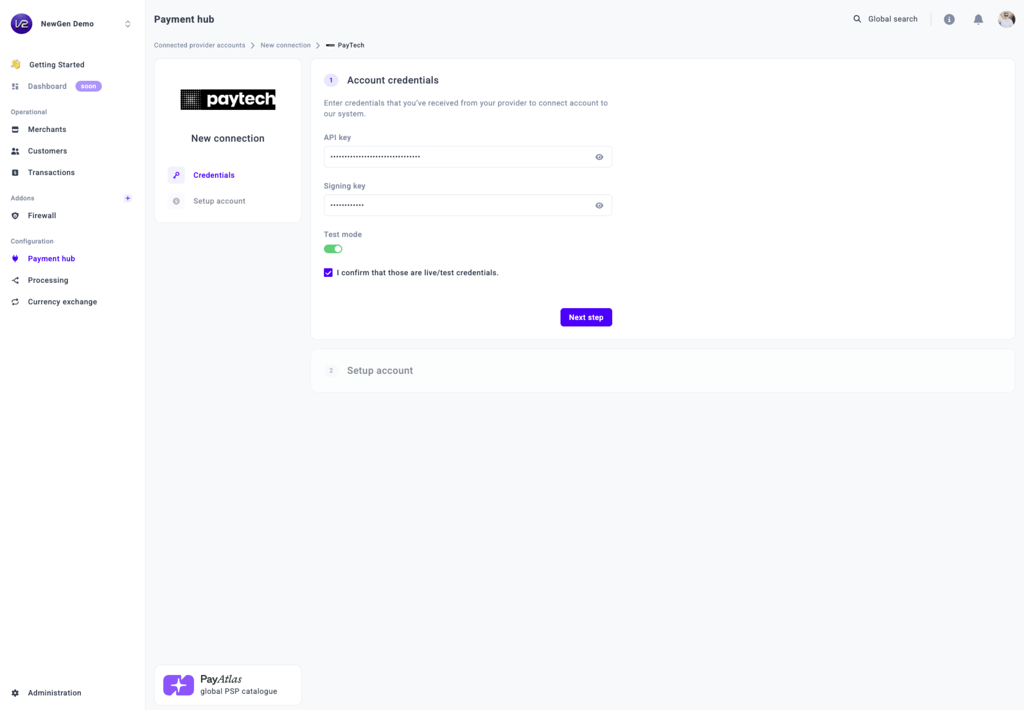
- Open Payment Hub and click New connection.
- From the list of available Providers, select Paytech and click Connect.
- Open the Credentials tab and enter the required credentials: API key and Signing key.
- Then, optionally switch on the Test mode toggle, depending on the credentials type.
- Click I confirm that those are live/test credentials.
- Select one or more Currencies from the combo box. The system creates a separate Provider account for each selected currency.
- Click Connect.
Updated about 2 hours ago
Did this page help you?